
Rentals and due reminders
Know which returns need a follow-up.
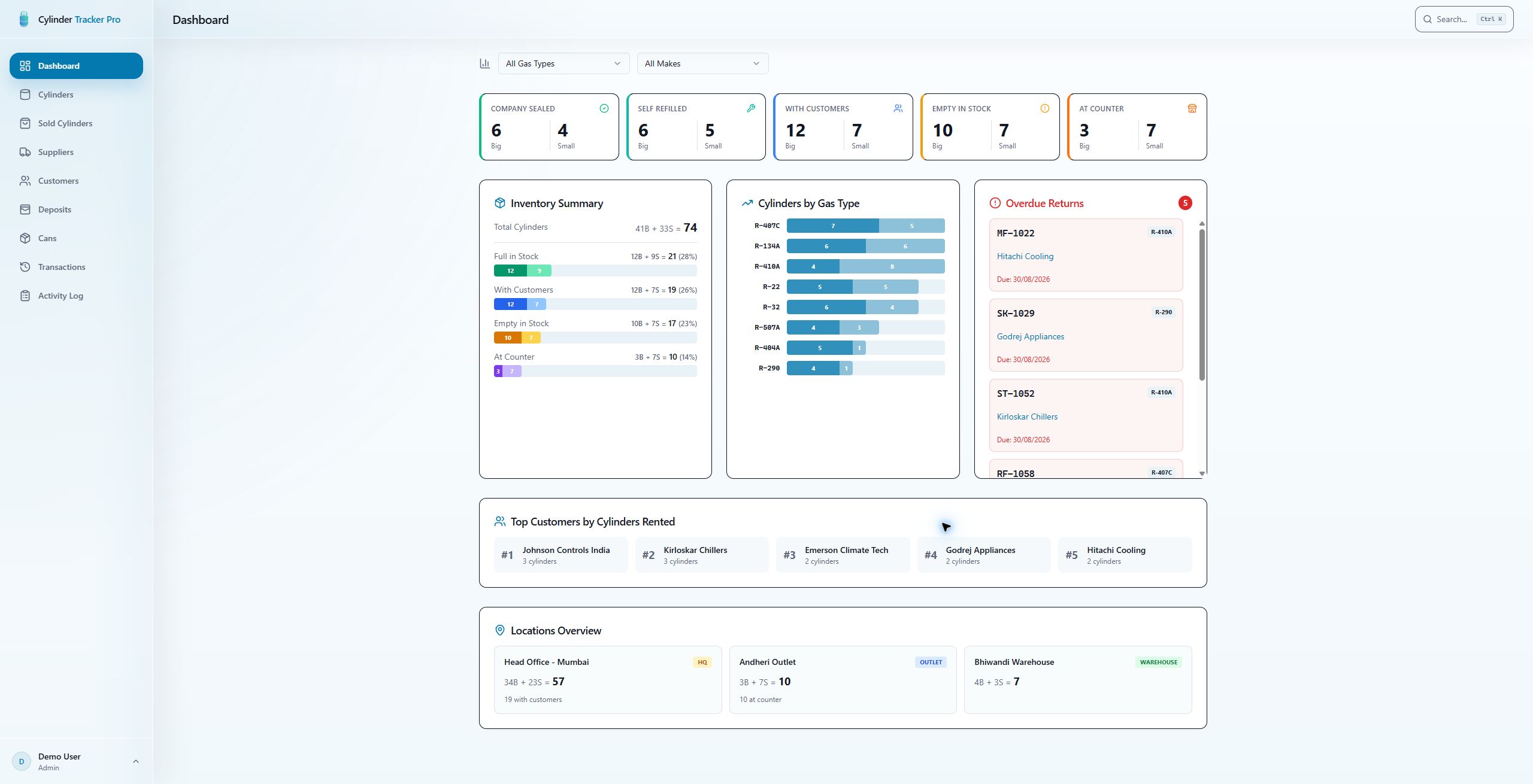
Track the customer, invoice and due date against a rental. Review overdue cylinders and prepare a WhatsApp reminder draft that you send yourself.
Explore rentals and due remindersKnow what is out, what is due, and what you hold in deposits.
Keep rentals, returns, sales and supplier balances on record. Give your counter team the details they need, without searching through a register.
Yearly pricing for new businesses. View pricing and user terms.
Know which returns need a follow-up.
Track the customer, invoice and due date against a rental. Review overdue cylinders and prepare a WhatsApp reminder draft that you send yourself.
Explore rentals and due remindersSee what you collected and what you refunded.
Record deposits with cash or account payment mode and a receiving account where configured. Review pending refunds and completed refund history.
Explore deposits and payment recordsKeep sales separate without losing the history.
Review sold cylinders outside active inventory. When a sold cylinder comes back, record a full or empty return, individually or in bulk, with the sale history retained.
Explore sold cylinders and return-to-stockKeep unnumbered balances on record too.
Add or reduce unnumbered customer cylinder balances by size and type, with notes for context. Keep quantity adjustments distinct from individual cylinder histories.
Explore customer quantity adjustmentsKnow which quantities are yours to keep.
Separate returnable supplier stock from quantities owned by your business. Record an ownership conversion, newly purchased owned stock or an ownership correction.
Explore supplier-owned or business-ownedFix the details without silently rewriting the record.
Correct supported past dates, rental due dates, invoice numbers and notes with a reason and before-and-after audit trail. Undo the latest eligible details edit; chronology and linked-stock restrictions still apply.
Explore audited corrections and guarded undoGive access without giving editing rights. The read-only Viewer role can view records, download ledgers and prepare sharing drafts. Owner, Admin and Staff roles cover operational access.
Assign a rental or record a sale. Add the customer, invoice reference, date and deposit details.
Review overdue rentals with the customer and cylinder details. Prepare a reminder draft when you need to follow up.
Record a full or empty return and any deposit refund. Correct supported past details with an audit trail when an entry needs fixing.
Import Excel or CSV records. Export inventory to Excel or PDF, download customer ledgers, and prepare summaries to share yourself.
Explore imports and reportsRecord a rental due date and review overdue returns in the dashboard. Open a customer to see the late cylinders and prepare a WhatsApp reminder. You review and send the message yourself; messages are not sent automatically.
Yes. Record deposits collected and refunds, with cash or account payment mode and a receiving account where configured. Customer records show the deposit balance. These are payment records, not payment processing or bank reconciliation.
Adjust unnumbered customer balances by size and type, with notes for context. Supplier records distinguish quantities owned by your business from returnable supplier stock. Numbered cylinders keep their individual histories.
Yes. Sold Cylinders keeps sales separate from active stock. Record a sold-cylinder return as full or empty, individually or in bulk, while retaining the sale and return history.
Authorized users can correct supported past transaction dates, rental due dates, invoice numbers and notes with a reason. Before-and-after details are logged. Details edits do not change stock or money; date restrictions and latest-edit checks guard corrections and undo.
Yes. The Viewer role can view records, download ledgers and prepare sharing drafts without editing stock. Owner, Admin and Staff roles provide the relevant operational access.
See our yearly pricing for new businesses. Final commercial terms remain pending; contact sales to confirm included users and discuss your setup.
This is the marketing website. Use Log in in the navigation to open the separate application. Contact sales here to discuss your setup.
Tell us how you handle rentals, deposits and supplier stock today. We will help you assess the fit and confirm the commercial terms.